
-
1Create an MBSA Clubhouse Account
Head to the MBSA Clubhouse and click Become a Member. Choose a membership option and fill in your information. During sign-up, you'll reach a Boat Registration step — enter your sail number (required), boat name, manufacturer, length, and draft. You can also check "I would like help getting a Handicap rating" if you need one.
MBSA Clubhouse -
2Set Your Preferences
After boat registration, you'll reach a Preferences step. Make sure to check "Participate in Crew Finder" — this enables the crew-matching features for your account. You can also opt into the Member Directory and MBSA mailing list.
-
3Set Up Your Boat for the Crew Finder
After your account is created, a Get Started wizard will walk you through setting up your boat. First, confirm your boat details — class, primary location (club/marina, city, state), and mooring/slip number.
Next, you'll be asked "Publish to Boat Finder?" — click "Yes, Set It Up" to create your Boat Finder listing. Fill out the Boat Finder Profile:
About This Boat — Describe your boat, the kind of sailing you do, and what makes your program special. Set your Ethos (competitive, cruiser, etc.) and typical crew complement.
Roles We Need — Select the positions you're looking to fill (Navigator, Tactician, Helm, Main Trim, Jib Trim, Bow, Pit, Mast, Grinder, Ballast).
Race Areas & Availability — Choose Mass Bay North, Central, and/or South, and indicate Weekend and/or Weekday/Evening races.
Policies — Set your Accepting Crew status and Drinking Policy (both required), and check "Looking for Junior Crew" if applicable.
You can update all of this anytime from the Profile tab on your boat page, and toggle "Publish to Boat Finder" on or off from the Overview tab.
-
4Build Your Position Configurations & Invite Your Crew
From your boat page, go to the Positions tab to define crew configurations for different sailing scenarios — for example, a 7-person spinnaker setup, a 4-person jib & main configuration, or a double-handed crew. Each configuration lists the specific roles needed, so when crew apply, they know exactly what positions are available.
If you already have crew members on the platform, you can invite them directly to your boat from here — no need to wait for them to find you through the calendar.
-
5Register for Races & Find Crew
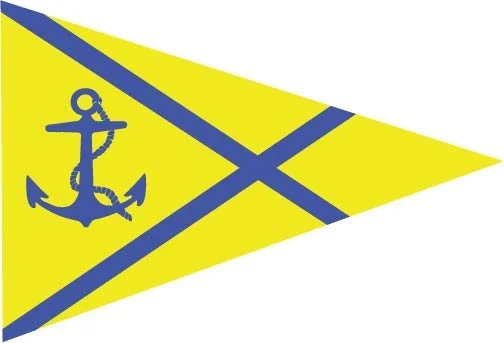
Go to Races in the left sidebar menu to see the MBSA Sailing Calendar. When you register your boat for a race and indicate that you're accepting crew, a yellow anchor icon (⚓) appears on your race listing — signaling to sailors browsing the calendar that your boat has open spots.
You can also find crew proactively. Races with a blue person icon () mean there are sailors who have marked themselves as available for that race. Click into the race and go to the "Available Crew" tab to see who's looking — including their experience level, years of sailing, and preferred positions.
When a sailor clicks "Request to Race" on your boat, you'll receive their request and can review their full sailing profile — experience level, roles, certifications, and bio — before accepting or declining.
- Go to the Photos tab on your boat page and upload great shots — action on the water, the cockpit, your team after a race
- Write a real "About This Boat" description — competitive? casual? social? be honest about your program
- Set up multiple Position Configurations so crew can see exactly what roles are available in different scenarios
- Keep your "Accepting Crew" status current — turn it off when you're fully crewed so you don't get unnecessary requests
Consider entering the Rookie Class — it's designed for boats building newer crews.
Your boat's listing isn't limited to CYC sailors. The MBSA Clubhouse connects you with crew from every member club in Massachusetts Bay — so whether you need a regular Wednesday night trimmer or a fill-in for a weekend regatta, you're reaching the widest possible pool.
Go to MBSA ClubhouseYou can also reach any member of the CYC Board.